A month on the iPhone Duo: the compromises faded, the folding stayed
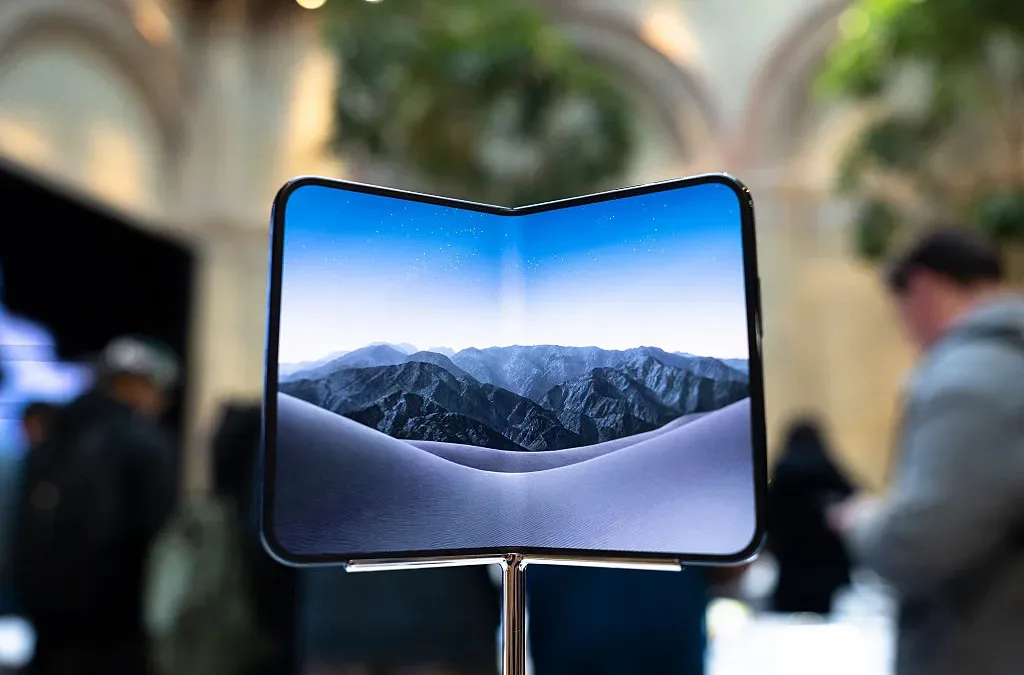
For years, a premium smartphone was defined by its cameras, its processor and how light it felt in a pocket. The iPhone Duo challenges that, asking buyers to pay more for a fundamentally different experience, even if it means giving up features long treated as high-end. After a little under a month with the Duo, I found the trade-offs I first worried about matter far less than expected. More interesting is how the foldable form factor has changed my everyday habits — how I interact with apps, which apps I use, and how I organize and personalize the phone.
I also easily forgot several of my initial concerns about switching. The apps are mostly optimized for the Duo now, I’ve reacquainted myself with Touch ID, and I don’t miss the Pro Max camera on most days. That’s not to say the Duo has no shortcomings. I still miss the telephoto lens sometimes and still long for Face ID — though not as much since Apple shipped a face unlock feature in the latest update. But after a month, these compromises have had less impact on my day-to-day experience than the benefits the new form factor brings.
Multitasking feels more natural
I was surprised by how much I’ve grown to appreciate the Duo’s multitasking. Initially I didn’t think I’d regularly view two apps side by side, given the still fairly limited screen space even unfolded, especially next to an iPad. But I find myself snapping apps to both halves of the screen more often than I imagined.
Apple has made side-by-side mode intuitive: you drag an app to the left or right side of the screen and drop it into the target box that appears. I regularly keep X open as I read the news, switching between an article and real-time reactions to it. Sometimes I keep email or Slack on one side while working on something else so I don’t miss an important message. And, much like the overstimulated members of Gen Z (which I am not), I sometimes scroll social media while engaging with other media beside it. Case in point: I passively watched Netflix’s “Love is Blind” reunion while reading gossipy tweets and Reddit posts about the main characters on the other half of the screen. This used to be called second-screen viewing, but it’s morphing into something new. Everything happens on one screen now — “Duo screen viewing,” perhaps? It makes me long for more interactive TV experiences where commentary and content are combined.
It really is like having two phones
I’ve noticed another shift since adopting the Duo as my main device. Out and about, it feels more like an (arguably heavier) iPhone mini. For those who still miss smaller iPhones, the Duo is the next best thing. Despite its weight, the phone feels small: you can cover it with one hand, type with a thumb, reach the top and bottom easily, and fit it into front and back pockets. The Pro Max now feels unbelievably strange in my hand — how was I ever comfortable wrangling this giant rectangle?
The small screen works well on the go, especially for short interactions like a quick text or pulling up directions. It’s not as great for mindless scrolling, which I appreciate, because it forces me to engage with the real world instead of killing every moment of boredom by opening apps. But at home or somewhere with time to kill, you can unfold the screen and enjoy apps super-sized. It’s the best of both worlds.
I instinctively unfold the phone when preparing to watch videos, since the larger screen is best for that. It’s also unfolded when I’m shopping, as it’s more convenient for looking at products, zooming in on details or completing checkout forms. Generally I unfold the Duo when actively using apps. This has also let me rethink my Home Screen: with the Duo closed, I prefer to see just widgets with key information like weather, time and battery life, with the only app icons in the dock.
The Duo apps are ready now
In the weeks since launch, most apps that weren’t yet optimized for the Duo have been upgraded to support its foldable form factor. In mid-November, Apple said there were over 200,000 Duo-ready apps, and in my experience that feels true. Most of my daily drivers — with the glaring exception of key Google apps like Gmail and Drive — have dropped the black band on the side of the screen that frustrated early testers. Most apps now use the available space, whether on the small front screen or the wider unfolded one.
It’s been interesting to see how differently developers have optimized their apps. Some use the form factor for novelty: a note-taking app that opens and closes like a notebook, with pages you can write on with the Apple Pencil; a retro Walkman-like music player; a tiny typewriter; a gaming handheld; a game where you close the phone to make grilled cheese. As much as I love the whimsy, I appreciate how my everyday apps feel better on the unfolded screen. Spotify, at last, feels less cluttered with more screen real estate. A number of note-taking, list-making and calendar apps also feel more usable when spread out. The Netflix app is fantastic, with support for multiple viewing modes, including playing video on the closed outer display, a “laptop” orientation with big player controls, and a “tent” mode.
Other developers have similarly reimagined how their apps would work if designed from the start for the Duo’s small and larger screens. One good example is Sofa, a utility for organizing the books, movies, TV shows, podcasts, albums and games you want to check out. When the Duo is closed, its navigation is tucked into a vertical bar on the right while the main screen focuses on saved items. When the Duo is unfolded, the number of items displayed on